Updated
9 min read


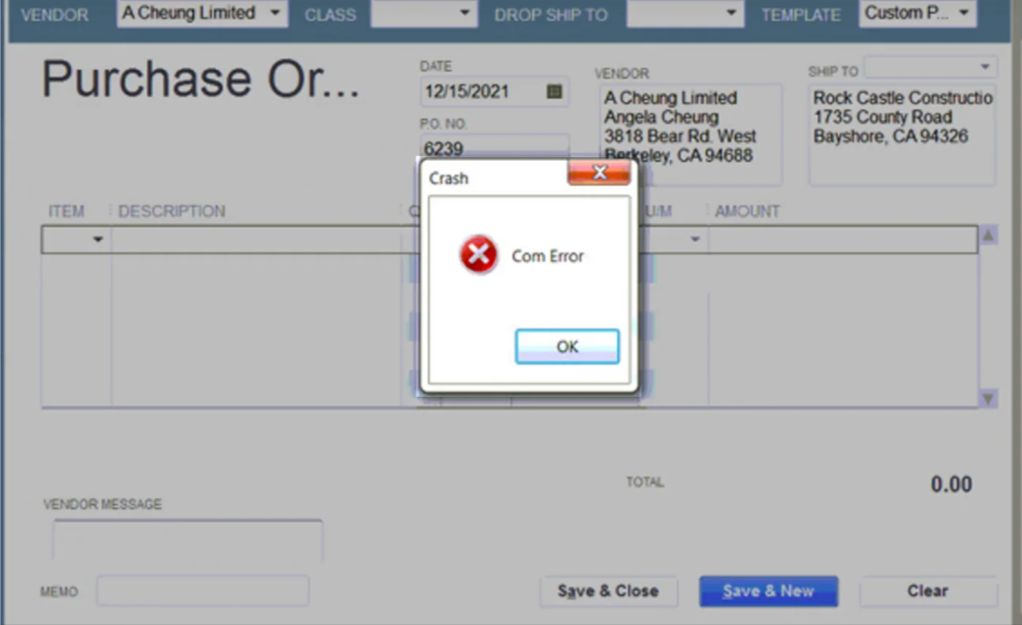
Every business needs efficient invoicing software and QuickBooks Desktop makes this process easier for you. On the other hand, a “QuickBooks Crash Com error” while mailing invoices can be annoying and can cause delays in your work. This mistake may cause undue stress and possible productivity loss by interfering with operations, communication, and timely transactions.
In this article, we will explore the root causes of this problem and provide you with different step-by-step solutions to ensure an effortless solution. We will cover everything you need to know to address this error, from troubleshooting to QuickBooks settings improvement.
Regardless of your level of experience with QuickBooks, these professional advices will help you to get past the “Com Error” while mailing invoices. Say goodbye to disruptions in your billing procedure and encourage flawless, ongoing business operations.
The “QuickBooks Com Error” while mailing invoices message appears as a message stating that the server cannot establish a connection with the client’s connection, which stops the billing procedures from being completed successfully. This error may be caused by various things, such as incompatible email settings, broken QuickBooks components, out-of-date software, or problems with the Windows operating system.
This error may cause various effects, such as delayed billing, interrupted workflow, and even possible loss of income and clients. This issue must be resolved quickly to ensure effective business operations and guarantee timely stakeholder communication. To restore normal functionality and resume uninterrupted invoicing procedures, resolving the “com error” involves identifying the root cause through troubleshooting techniques and implementing appropriate solutions, like software updates, email settings adjustments, or QuickBooks component repairs, into practice.
QuickBooks com error can be resolved in multiple ways, you may have to follow one or more of the solutions given below in this article to solve the error.
Note: You must create a backup of your QuickBooks data before you proceed with the following solutions
Having Trouble with QuickBooks COM Error? We're Here to Help!
If you're experiencing the 'Crash COM Error' in QuickBooks Desktop, don't let it slow you down. Our support team is ready to assist you in resolving the issue quickly and effectively. Contact us now for expert assistance!
Try these steps to see if Microsoft Outlook is one of the email options and QuickBooks is having trouble finding it:
Note: You might need to restart your computer and fix QuickBooks if you are unable to see Microsoft Outlook. It can also be required to make a fresh Windows user profile.
Note: The current Microsoft Outlook profile is not deleted by this process.
Fixing the “QuickBooks Crash Com error” while mailing invoices is a crucial step in keeping your financial processes in QuickBooks Desktop accurate and efficient. You can resolve the error’s underlying causes and resume smooth client and vendor communication by putting the troubleshooting methods and solutions described in this article into practice. This will also maximize your QuickBooks settings, be alert for software updates, and take the initiative to resolve any possible conflicts or problems that may occur.
With the help of the above-given solutions, you can not only fix the “com error” but also improve your ability to use QuickBooks Desktop to its maximum capacity, which in turn helps your company succeed and expand.
If you still have any questions or need help with How To Resolve QuickBooks Com Error While Mailing Invoices in QuickBooks Desktop, you can reach out to QuickBooks Desktop Assistance at the toll-free number +1-888-245-6075.
Try these steps to resolve COM errors in QuickBooks Desktop:
1. Make sure QuickBooks is updated to the latest version.
2. Fix the installation of QuickBooks.
3. Modify the email configuration.
4. Use administrator rights to launch QuickBooks Desktop.
5. Turn off firewalls and antivirus software settings.
If problems continue, get in touch with QuickBooks support for more help.
To fix this issue:
1. Update QuickBooks to the most recent version
2. Use the QuickBooks File Doctor tool to identify and fix file problems
3. Make sure your system satisfies the minimum requirements
4. Turn off any conflicting apps
Contact QuickBooks support if issues continue to arise are some ways to prevent crashes in QuickBooks.
Making sure your system satisfies the minimum requirements is the first step towards fixing QuickBooks Desktop installation errors. Next, use the clean install tool to uninstall and reinstall QuickBooks. Run the installation as administrator, temporarily disable your firewall and antivirus software, and contact QuickBooks support if the issue continues.
Open QuickBooks and select the File option to fix a company file in QuickBooks Desktop. Choose Utilities, then Verify Data to find problems. If mistakes are discovered, select Rebuild Data to correct them. Before performing any repairs, always make a backup of your company file.
Update QuickBooks to the most recent version as a starting point if it crashes when you try to open a company file. Next, make sure all data is correct by rebuilding and verifying your company file. Try opening the file in a different version of QuickBooks if the issue still arises, or get help from QuickBooks support.
A COM error that is causing crashes in QuickBooks Desktop 2021 can be fixed by making sure QuickBooks is up to date. Proceed to fix the QuickBooks installation, modify the email settings, launch QuickBooks as administrator, and turn off the firewall and antivirus software for a while.
Update QuickBooks to the most recent version to fix a COM error that is causing crashes in QuickBooks Desktop on Windows 10. Next, fix the QuickBooks installation, change the email settings, launch QuickBooks as administrator, and turn off the firewall and antivirus software for a while. If problems continue, get in touch with QuickBooks support for more help.
Make sure QuickBooks is updated to the most recent version that is compatible with Windows 11 to fix a COM error that is causing crashes in QuickBooks Desktop on Windows 11. Next, fix the QuickBooks installation, change the email settings, launch QuickBooks as administrator, and turn off the firewall and antivirus software for a while.
About the author
Have a QuickBooks® question? Our ProAdvisors can help. QAsolved is not affiliated with Intuit.