Updated
20 min read



Running a growing business often means relying on more than one powerful system to keep things moving. Maybe you use NetSuite to manage operations, inventory, and customer data, while QuickBooks handles your accounting and financial reporting. On paper, it sounds like a solid setup. But in reality, it can start to feel like juggling two worlds that don’t always speak the same language. You create an invoice in one system, then re-enter it in another. You update customer records twice. And every month, you cross your fingers during reconciliation.
At first, the extra steps may seem manageable. A few manual entries here and there do not feel like a big deal. But as transactions increase and your team expands, the cracks begin to show. Small errors turn into bigger discrepancies. Reports do not match. Time that could be spent analyzing growth is instead spent fixing sync issues and tracking down missing data. That is when the question becomes unavoidable: is there a better way to make these systems work together?
Connecting NetSuite with QuickBooks is more than a technical upgrade. It is a strategic move toward efficiency. By integrating the two platforms, you create a seamless flow of financial and operational data, reduce manual work, and improve accuracy across the board. In this blog, we will explore how to connect NetSuite with QuickBooks and what you need to know before setting up a smooth, reliable integration.
Oracle NetSuite is a cloud-based Enterprise Resource Planning (ERP) solution designed to help businesses manage core operations within a unified platform. It supports organizations of all sizes by centralizing financial management, inventory control, order processing, CRM, and eCommerce operations.
As a comprehensive ERP system, NetSuite provides real-time visibility into business performance and enables better decision-making through consolidated reporting and automation.
Beyond its core ERP functionality, Oracle NetSuite offers a wide range of advanced modules designed to support growing, global, and operationally complex businesses. From multinational financial consolidation to warehouse optimization and subscription billing, NetSuite provides an integrated cloud platform that connects departments and delivers real-time visibility across the organization.
NetSuite OneWorld enables global business management within a single unified system. It supports multiple subsidiaries, currencies, languages, and tax regulations, allowing organizations to manage international operations seamlessly. Businesses can consolidate financial reports across entities while maintaining compliance with local accounting standards and tax requirements.
NetSuite streamlines purchasing workflows by managing approved vendor lists, automating purchase order creation, and tracking vendor performance. This ensures better cost control, compliance, and procurement efficiency.
This module provides real-time visibility into inventory levels across multiple warehouses and locations. It supports inventory tracking, cycle counts, bin management, and automated reorder points to prevent stockouts and overstocking. By optimizing stock levels and improving fulfillment accuracy, businesses can enhance operational efficiency and reduce carrying costs.
NetSuite includes built-in CRM capabilities such as sales force automation, lead and opportunity tracking, marketing campaign management, and customer data management. This ensures better visibility into the sales pipeline and improves customer engagement.
This dashboard provides a comprehensive overview of bank transactions and virtual card activity. It automates reconciliation processes, enhances financial transparency, and improves operational efficiency by reducing manual intervention.
The platform offers customizable dashboards known as portlets, which display key performance indicators and real-time analytics. Users can personalize system terminology, create saved searches, and generate detailed financial and operational reports. These capabilities enable data-driven decision-making across departments.
Built on Oracle Cloud Infrastructure, NetSuite provides enterprise-grade security, automatic updates, and continuous system enhancements. Its cloud-native design ensures 24/7 accessibility, scalability for growing businesses, and reduced IT infrastructure maintenance.
It supports multi-currency transactions, multi-subsidiary management, and consolidated financial reporting. This makes it suitable for businesses operating across different regions while ensuring regulatory compliance and centralized control.
NetSuite allows users to create customizable dashboards, saved searches, and automated workflows. These tools help streamline business processes, reduce manual work, and improve overall productivity.
On the other hand, QuickBooks is a widely used accounting software developed by Intuit, primarily designed for small and medium-sized businesses. It focuses on simplifying bookkeeping, invoicing, payroll, tax calculations, and expense tracking.
The QuickBooks product suite offers a range of accounting solutions designed to meet the needs of businesses of different sizes and industries. From cloud-based bookkeeping to advanced enterprise-level financial management, QuickBooks provides tools for invoicing, expense tracking, payroll, reporting, and tax management.
QuickBooks Online is a cloud-based accounting solution that allows businesses to manage their finances from anywhere with internet access. It offers features such as invoicing, expense tracking, bank reconciliation, financial reporting, tax calculation, and seamless integration with third-party applications. It is ideal for small to medium-sized businesses looking for flexibility and real-time financial visibility.
On the other hand, QuickBooks Desktop is a locally installed accounting software that provides robust financial management capabilities, including advanced reporting, job costing, inventory tracking, and payroll management. It also offers industry-specific editions tailored for sectors such as manufacturing, retail, and contracting, making it suitable for businesses with complex accounting needs.
QuickBooks Enterprise is a more powerful and scalable version of QuickBooks designed for growing and mid-sized businesses. It includes enhanced reporting tools, advanced inventory management with barcode scanning, customizable user permissions, and higher data capacity to handle large transaction volumes efficiently.
Specifically built for freelancers, consultants, and independent contractors, this version helps users track income and expenses, categorize transactions, calculate estimated taxes, and separate personal and business finances. It simplifies bookkeeping for individuals who need straightforward financial management.
You can explore all the other QuickBooks Products or reach out to us directly to connect NetSuite with QuickBooks. While NetSuite functions as a full-scale ERP system and QuickBooks focuses primarily on accounting, many organizations use both platforms together.
To streamline synchronization between them, Oracle provides a predefined integration recipe that helps users create a bridge between these two powerful platforms. The following sections of this blog explain that integration framework in detail, including configuration, setup, and execution steps.
This integration recipe is designed to synchronize item records from Oracle NetSuite with product records in QuickBooks. It is available in the Integration Store under the name “Oracle NetSuite – QuickBooks | Sync Items and Products.”
Oracle provides this recipe as a sample implementation intended for guidance purposes. It is not guaranteed to be error-free, and official support is not included. Organizations are expected to review, test, and adapt the configuration based on their specific business requirements.
The recipe automates the synchronization of both inventory items and sales service items from NetSuite to QuickBooks. The integration runs based on a schedule defined within Oracle Integration, although it can also be executed manually when required.
To begin using the recipe, you must:
The recipe includes two predefined scheduled flows:
After successfully creating the product in QuickBooks, the integration updates the related NetSuite item record by populating the QuickBooks ProductItem Id field with the newly generated QuickBooks product ID.
If the system is unable to update this ID back into NetSuite, the corresponding QuickBooks product is automatically marked as inactive to maintain data integrity. In addition to product creation, this integration also synchronizes essential data elements such as account mappings and unit pricing between the two platforms.
Note: The integration creates products in QuickBooks only for those NetSuite item records where the QuickBooks ProductItem Id field is empty. This ensures that duplicate products are not created during subsequent runs.
Integrating Oracle NetSuite with QuickBooks involves configuring system prerequisites, establishing secure connections, and activating predefined integration flows. The process ensures seamless synchronization of item and product data between both platforms through a structured setup within Oracle Integration.
Before initiating the integration, ensure that all required systems and access permissions are in place.
Note: To successfully connect Oracle NetSuite and QuickBooks through Oracle Integration and enable item and product synchronization, you must complete the required configuration steps in both systems beforehand.
If you want to eliminate the hassle of integrating NetSuite with QuickBooks and save valuable time, we recommend reaching out to Certified ProAdvisors for prompt and reliable QuickBooks integration services.
Before connecting Oracle NetSuite with QuickBooks through Oracle Integration, specific configurations must be completed within your NetSuite environment. These include enabling required web service features, setting up Token-Based Authentication (TBA) for secure access, and creating saved searches to define which records will be synchronized.
All configurations must be performed by logging in with an Administrator role. To allow Oracle Integration to communicate with NetSuite:
| Tab Name | Permission | Level |
| List | Currency | Full |
| List | Currency | Full |
| List | Subsidiaries | Full |
| List | Contacts | Full |
| Setup | User Access Tokens | Full |
| Setup | Log in Using Access Tokens | Full |
| Setup | Soap Web Services | Full |
Note: Similarly, create an additional saved search for Sales Service Items. Ensure that the search criteria include filtering records where the QuickBooks ProductItem Id custom field is empty, the item type is set to Service Item, and the subtype is specified as Sales.
Moving ahead, to enable Oracle Integration to connect with QuickBooks and synchronize items and products, you must create a dedicated user account for Oracle Integration within QuickBooks and complete the necessary connection prerequisites and configurations.
Ready to sync NetSuite with QuickBooks?
Connect NetSuite with QuickBooks seamlessly and keep your financial data perfectly in sync. Get in touch with our experts today to discuss your requirements and discover the best integration approach for your business. Contact us now to get started!
This is where the real setup begins. In this section, we’ll walk through the practical steps to install and configure the integration recipe that connects Oracle NetSuite with QuickBooks.
Follow these five essential steps to successfully install, configure, and prepare the integration recipe for seamless synchronization between NetSuite and QuickBooks.
Now it’s time to connect the dots. In this section, we’ll quickly walk through the steps to set up and authenticate your Oracle NetSuite connection so it can securely communicate with Oracle Integration and power the sync with QuickBooks.
Now it’s time to link both platforms together. Here are the steps:
Before activating and running the recipe, it is very important to configure the account mapping lookup table correctly. Here are the steps to successfully edit the account lookup table and map the account names in the Oracle NetSuite with the account IDs in QuickBooks.
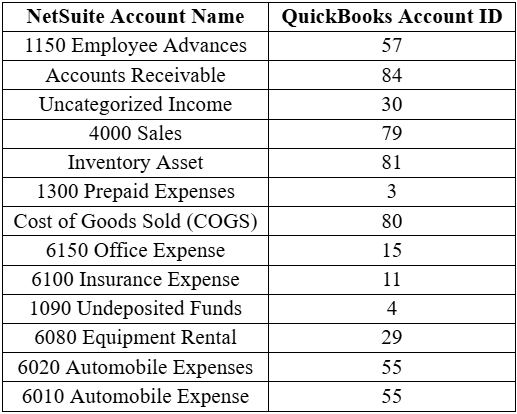
By completing the above steps, you can successfully configure and activate the integration between Oracle NetSuite and QuickBooks, ensuring secure connectivity and smooth synchronization of item and product data. With the configuration complete, the final step is to activate the integration and execute the recipe to begin synchronizing data between NetSuite and QuickBooks.
Now comes the exciting part. In this final section, you’ll activate the integration and run the recipe, so the synchronization between NetSuite and QuickBooks officially goes live and starts doing the work for you.
Integrating Oracle NetSuite with QuickBooks helps businesses streamline financial operations by ensuring smooth data synchronization between ERP and accounting systems. This connection reduces manual effort, improves accuracy, and provides better visibility into financial and operational data. Below are the key benefits of this integration.
Connecting Oracle NetSuite with QuickBooks is more than just a technical integration; it’s a strategic move toward smarter financial management. By eliminating manual work, improving accuracy, and enabling real-time data flow, this integration helps businesses operate with greater speed and confidence. It also strengthens collaboration across teams while supporting scalability and cost efficiency as the business grows.
Bringing Oracle NetSuite and QuickBooks together is a smart move for businesses that want to simplify how their financial and operational data works together. Instead of juggling between two disconnected systems, this integration creates a smooth flow of information that saves time, reduces manual effort, and improves overall accuracy. What once felt like a complicated and time-consuming process becomes far more structured and manageable.
From real-time data syncing to faster reconciliation and better reporting, the benefits directly impact day-to-day efficiency as well as long-term decision-making. Teams no longer need to worry about mismatched records or delayed updates, which means more focus can be placed on growth and strategy rather than fixing errors.
As businesses scale, managing finances and operations can quickly become overwhelming. This integration helps ease that pressure by keeping everything aligned and up to date across both platforms. It also encourages better collaboration between departments, ensuring everyone works with the same reliable data.
In the end, connecting NetSuite with QuickBooks is not just about improving systems but about improving how the entire business operates. If efficiency, clarity, and scalability are priorities, this integration is definitely worth considering as a long-term solution.
The integration flow supports two separate scheduled synchronization processes to ensure accurate product data transfer. One flow is designed specifically for sales service items using Oracle NS ServiceItem QB Product Sync, while the other handles inventory items through Oracle NSInventoryItem QBProduct Sync. These dedicated flows help maintain proper classification, data consistency, and structured product creation within QuickBooks based on the corresponding item types in NetSuite.
Yes, once the integration has been successfully activated, you can configure a schedule to automate its execution. You can define a specific start date, choose an exact time, and set the desired frequency such as daily, weekly, or at custom intervals based on your operational requirements and business workflow needs.
After executing the integration, sign in to your QuickBooks account to review the results. From the homepage, navigate to Products and Services, and carefully check the product list to confirm that the newly synchronized items from NetSuite have been successfully created and displayed in your QuickBooks instance.
Yes, proper configuration is required before installing and running the integration recipe. You must set up and verify both your NetSuite and QuickBooks instances by establishing secure connections between the systems. This includes enabling and configuring token-based authentication (TBA) in NetSuite, generating the required credentials, and creating appropriate saved searches to define and control which specific items will be synchronized with QuickBooks. Proper setup ensures a smooth, secure, and error-free integration process.
About the author
Have a QuickBooks® question? Our ProAdvisors can help. QAsolved is not affiliated with Intuit.