Updated
11 min read


The construction industry has witnessed impressive transformations in the past couple of decades. Be it raw material, machinery, or accounting techniques, the construction industry is only booming at a significant pace. One aspect that has helped them make informed decisions and strengthen the financial pillar is accounting software like QuickBooks. At present, small to mid-sized construction businesses are using QuickBooks to streamline their daily bookkeeping tasks effortlessly. But why do contractors trust QuickBooks? The answer is simple; QuickBooks is one of the most prominent and popular accounting and bookkeeping software for businesses of all sizes and verticals. Its advanced features help construction businesses gain better financial insights and grow organically. One such aspect is QuickBooks construction job costing!
QuickBooks construction job costing enables contractors to accurately track project expenses, monitor budgets, and ensure profitability. This powerful feature is one of the key reasons why QuickBooks has become the preferred choice for contractors worldwide. In this blog, we will help you to set up construction job costing in QuickBooks Online and Desktop. But before that, we will cover several other aspects of QuickBooks Construction, including:
So, let’s get started!
QuickBooks serves a wide range of industries, and construction is one of them. In QuickBooks, job costing for construction begins with setting up the project. This project consists of several activities that are related to all direct and indirect costs. As a contractor, you need to create a job cost sheet before starting the project.
This sheet involves several details like:
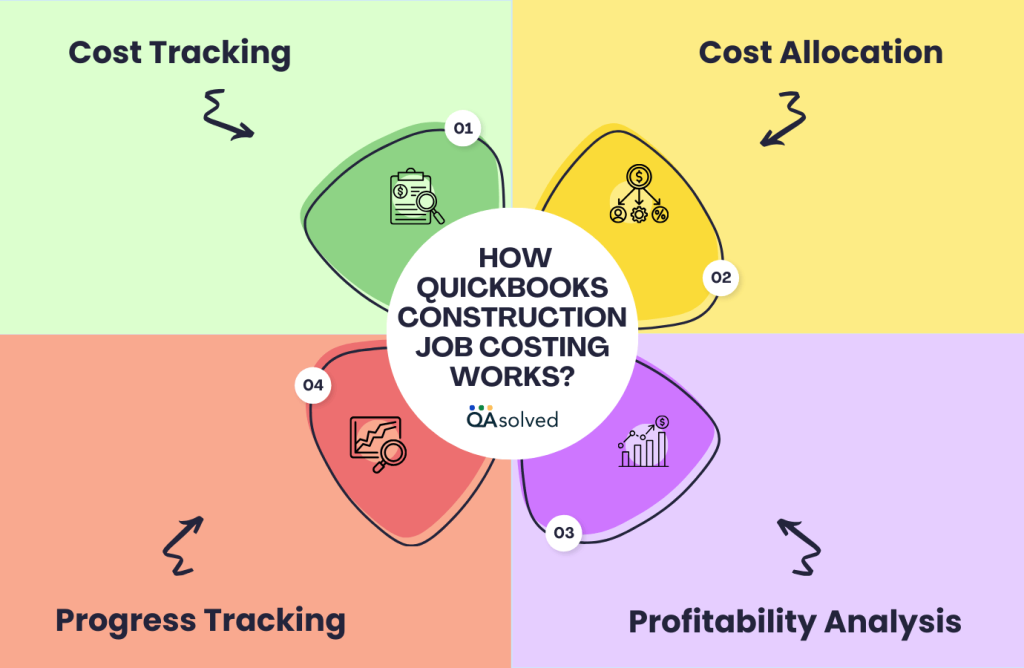
So, this is how you can make the best use of QuickBooks Construction job costing.
Also Read: Why is QuickBooks the Ideal Solution for Construction Businesses?
Job costing is a part of several industries. For the construction industry, job costing offers numerous advantages that can help improve efficiency and profitability. Here are some benefits of job costing:
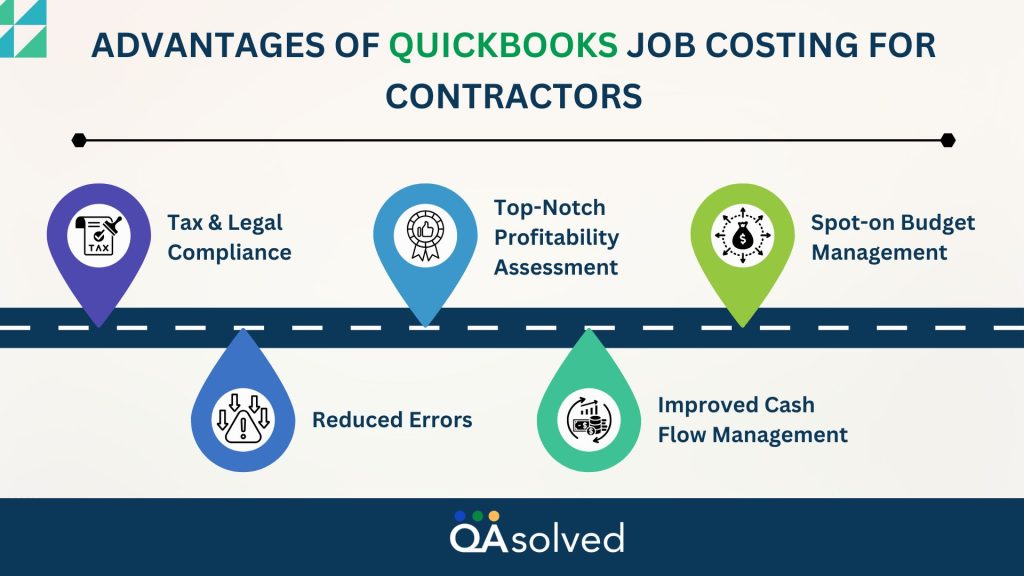
Job costing also helps you to stay compliant with a variety of regulatory requirements. These regulatory requirements include several activities like tax reporting and even contract compliance. This level of organization also simplifies tax filing, as you can easily generate reports that reflect all relevant expenses and income for each project, ensuring smooth and timely submissions.
With the help of job costing in QuickBooks, users can significantly minimize the scope of manual errors and transaction missing. This ensures greater accuracy in financial reporting, allowing contractors to make more informed decisions and maintain better control over their project budgets.
One of the biggest advantages for contractors of using tools like QuickBooks is that they can easily assess the profits. With job costing, users get a clear image of every project and its profitability by comparing revenue to actual costs—not operating costs. Hence, profitability assessment can optimize strategies, enhance profitability, and make adjustments to future projects to ensure better financial outcomes.
Another benefit of QuickBooks job costing for contractors is “Improved Cash Flow Management.” Job costing enables users to closely monitor cash flow and predict potential financial threats. This allows users to better manage cash flow and eliminate the scope of liquidity threats.
With detailed job costing reports, construction businesses and independent contractors can easily compare actual costs to the estimated budget, enabling them to identify any budget discrepancies early on, address issues promptly, and make necessary adjustments as needed to stay within financial goals.
Apart from these five, QuickBooks construction job costing helps users to identify cost trends, facilitates risk management, and even continuously supports improvements.
Building an effective construction job costing structure is essential for managing project expenses, staying within budget, and ensuring profitability. The following seven tips provide practical strategies to help contractors set up a reliable and efficient job costing system. Here we go!
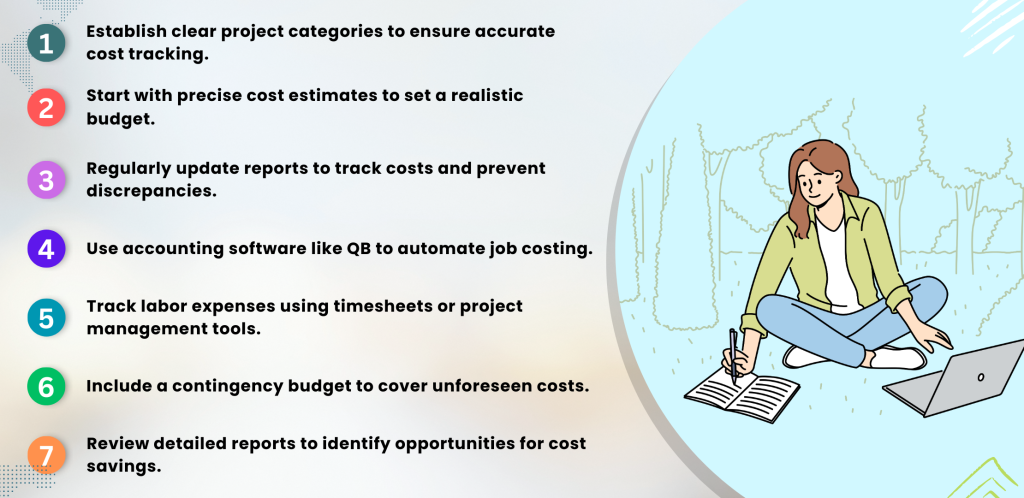
Now that we covered everything, let us talk about how to set up construction job costing in QuickBooks Online and Desktop.
Setting up construction job costing in QuickBooks Online and Desktop allows contractors to accurately track and manage project expenses, ensuring better financial control and decision-making. Let’s first talk about job costing in QuickBooks Online.
There are five major steps to setup job costing in QuickBooks Online for contractors and construction businesses:
To add a new construction job costing project in QuickBooks Online, follow these steps:
Here, you need to follow the below mentioned sub-steps.
QuickBooks Online ensures efficient cost management and budget control by directly allocating labor costs to a project, allowing for precise expense tracking.
You can allocate project time to employees using their weekly timesheets or QuickBooks Time. For one-time tasks, you can log them without needing timesheets. These expenses will be reflected in the project once payroll is processed.
Now, you need to assign all the other expenses to the project with the help of given steps:
So, these are the steps to setup construction job costing in QuickBooks Online. Let’s move ahead with QB Desktop now.
Also Read: How to Create an Estimate and Covert it to Invoice in QuickBooks Online?
Here are the five easy steps to setup job costing in QuickBooks Desktop:
To set up a job for each customer in QuickBooks Desktop, follow these steps:
In order to have a proper view of all the job costs, ensure that every expense is assigned to a specific job. When recording a bill, check, or timesheet, choose the appropriate job from the Customer column.
Note: Timesheets are non-posting entries, so you need to import time into a bill or invoice for it to appear in Job Profitability or Company Financial Reports.
With QuickBooks Desktop, you can create estimates internally and externally as well. If using spreadsheets or other tools, enter summary estimates into QuickBooks. If invoicing in QuickBooks, input estimate details in the Create Estimates window to convert them into invoices. Here are the steps to enter your estimates in QuickBooks Desktop:
Here are the two steps to create appropriate invoices:
Now, you can use Job Reports to assess job profitability, improve estimates, track financial progress, and spot potential issues before they become unmanageable.
To access different job reports:
QuickBooks Premier Contractor Edition and Accountant Edition provide a broader selection of job costing reports. To access them:
So, these are the steps to setup construction job costing in QuickBooks Online and QuickBooks Desktop. In case you’re unable to setup job costing via given steps, then it is ideal to connect with our certified ProAdvisors for expert QuickBooks assistance.
In conclusion, QuickBooks construction job costing is an essential tool for contractors to efficiently manage their project expenses, track profitability, and maintain financial control. By providing detailed insights into labor, materials, overhead, and other costs, QuickBooks helps contractors make informed decisions and avoid budget overruns. With the right setup, whether in QuickBooks Online or Desktop, contractors can streamline their processes, reduce errors, and ensure that each job remains profitable.
Yes, you can use QuickBooks Online and Desktop for construction job costing activities. Apart from job costing, QuickBooks allows users to automate invoicing, manage payroll, track inventory, and integrate with construction applications.
A common construction job costing structure involves two prominent components:
1. Direct Costs: Materials, labor, and equipment costs.
2. Indirect Costs: Project management or administrative costs.
Yes, QuickBooks can handle project costing. It allows contractors and businesses to track and manage costs associated with specific projects. Using job costing features, QuickBooks helps you assign and monitor expenses like labor, materials, overhead, and subcontracted services for each project.
There are five steps involved in the construction job costing process:
1. Setting up a project.
2. Tracking costs
3. Allocating costs
4. Tracking your progress
5. Analyzing your profitability
About the author
Have a QuickBooks® question? Our ProAdvisors can help. QAsolved is not affiliated with Intuit.