Updated
9 min read



Accounting is not just about crunching numbers and drafting budgets – it’s about keeping track of every financial responsibility your business faces. Among these responsibilities, Accounts Payable (AP) stands out as one of the most crucial aspects for small and medium-sized businesses. From vendor invoices and supplier payments to rent and utilities, every business has bills to pay. It can be challenging to track and manage these financial obligations, especially as your business grows. That’s where QuickBooks comes in, offering a user-friendly and efficient way to keep a track on all your payables. QuickBooks enables you to record, track, and manage all your payable accounts in one place. Moreover, tracking due dates, scheduling payments, or generating reports is easy with QuickBooks.
Besides saving time, QuickBooks also enables you to have a clear visibility into your financial health, allowing you to make informed business decisions. In this blog, we are going to cover several essential aspects of Accounts Payable. So let’s get started!
The accounts payable account represents the amount owed to vendors and subcontractors for goods and services received. In addition to short-term liabilities, this balance also includes bills and other liabilities due within the next few months.
Accounts payable is part of the liabilities section in the balance sheet equation:
Assets – Liabilities = Equity
The balance sheet categorizes accounts into current and noncurrent.
Accounts Payable (AP) and Accounts Receivable (AR) are both important parts of a business’s financial system, but they represent opposite sides.
Example: A business receives goods from a supplier and promises to pay them within 30 days.
Example: A business sells products on credit to a customer who must pay within 30 days.
Accounting Payable (AP) in QuickBooks provides businesses with several key benefits, helping to streamline financial management and increase efficiency. The following are some of the main advantages:
Also Read: How to Fix Negative Accounts Payable in QuickBooks?
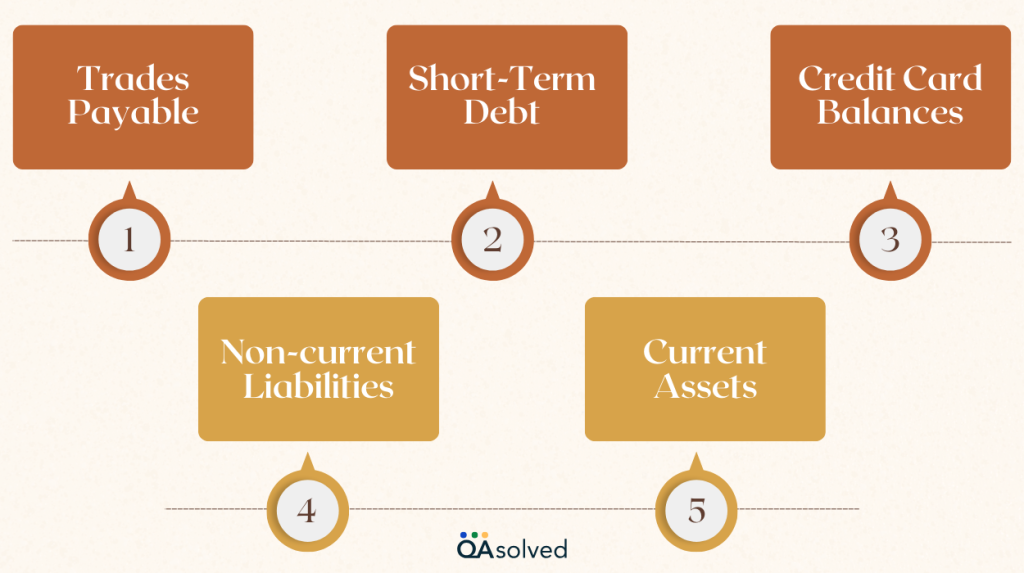
Let’s discuss the components of QBO Accounts Payable and their effects on your overall accounts payable system. Accounts payable is a part of current liabilities, representing obligations settled within the next 12 months. Other components of current liabilities include:
Note: The accounts payable balance significantly impacts your business’s cash flow.
QuickBooks accounts payable workflow enables businesses to manage bills and payments efficiently, ensuring timely and accurate financial transactions.
Here are the 5 simple yet effective steps to create a flawless Accounts Payable report:

Accounts payable starts with the creation of a chart of accounts, which organizes your financial transactions. There are five main types of accounts in a chart of accounts:
There is a specific name, number, and financial statement for each category. To keep things organized, you can also create subcategories.
Use vendor details to track orders and payment deadlines, and use codes to remind yourself to make payments. The following are some common vendor codes:
Ensure that the invoice is accurate and that you have received the correct product or service before paying. This three-way match ensures everything is in order:
Input the invoice details (number, amount, due date) into your accounting software once you have verified them.
After verifying the invoices, you can pay the vendors. It may be necessary to notify them when the payment has been processed, depending on their preferred method of payment. To ensure all payments are up to date and completed, review your accounts payable weekly.
Once you have completed these steps, update your books to reflect the latest information. Once a vendor payment has been made, remove it from your accounts payable list, and repeat the process every week.
So, by automating reconciliation, accounting software can ensure timely payments and prevent late fees. By setting up Accounts Payable in QuickBooks, you can track and manage vendor bills and payments efficiently.
Struggling to Manage Accounts Payable in QuickBooks?
Managing your accounts payable efficiently is crucial for maintaining cash flow and keeping vendors happy. QuickBooks makes it easy to track, pay, and reconcile your bills — but if you're unsure where to start or need expert assistance, we’ve got you covered! Contact us today! Our experts can guide you through the setup, management, and reporting, so you can focus on growing your business.
Optimizing accounts payable ensures smoother financial operations and greater efficiency. Apart from automating invoices, consolidating payment tracking, and defining approval steps.
So, take control of your Accounts Payable with QuickBooks and optimize your financial operations effortlessly. Regularly reviewing invoices and leveraging automation can make accounts payable easier and more efficient.
Managing your Accounts payable plays a key role in maintaining healthy cash flow and fostering strong relationships with vendors. With QuickBooks, invoice tracking, payment scheduling, and financial reporting are automated. You can save time, avoid late fees, and keep your business finances in order by reducing manual tasks and minimizing errors. Regardless of your business size, QuickBooks provides the control and clarity you need to stay on top of payments.
Reach out to QuickBooks experts for guidance on how to maximize QuickBooks for your AP process.
1. Repair Services
2. Inventory
3. Supplies
4. Raw Materials
Accounts Payable represents the short-term obligations owed by your business, requiring payment within one year. These sums, distinct from expenses, do not affect the income statement as they are considered debts. Instead, they are listed as current liabilities on the balance sheets, not under the category of accounts payable.
Typically, Accounts Payable maintains a credit balance since it represents the amount owed to suppliers. Nevertheless, it may shift to a debit balance after the payment has been made to the vendor.
Embracing automation for accounts payable is highly recommended and advantageous. Utilizing automation tools like QuickBooks Online streamlines accounting procedures and minimizes errors that often occur in non-automated AP processes. Additionally, it offers several benefits, including:
1. Simplification of Filing Systems: Automation streamlines the storage and organization of financial data, making it easier to access and manage documents related to accounts payable.
2. Scalability for Future Growth: Automated systems are designed to handle increased volumes of transactions, making them more manageable as your business expands.
3. Reducing Reliance on Employees: Automation reduces the need for manual data entry and repetitive tasks, allowing employees to focus on more strategic and value-added activities.
About the author
Have a QuickBooks® question? Our ProAdvisors can help. QAsolved is not affiliated with Intuit.