

If you’re still relying on QuickBooks Desktop 2023 to manage your business finances, it’s important to understand a major change that’s on the horizon. Intuit has officially announced that QuickBooks Desktop 2023 will reach its service discontinuation date on May 31, 2026, marking the end of support and access to several critical features. But what does “QuickBooks Desktop 2023 discontinuation” actually mean for your day-to-day operations? Well, let’s clear the fog.
Contrary to what many users assume, the software won’t suddenly stop working overnight. However, after the cutoff date, you’ll lose access to essential services like payroll processing, online banking, payment integrations, and live technical support. Even more importantly, the software will no longer receive security updates, which could leave your financial data exposed to potential risks.
For businesses that depend on automation, real-time transactions, and compliance-ready tools, this shift can significantly impact workflows. QuickBooks Desktop 2023 discontinuation also reflects Intuit’s broader strategy of phasing older desktop versions in favor of newer, subscription-based solutions with enhanced features and security.
In this article, we’ll break down everything you need to know about the QuickBooks Desktop 2023 service discontinuation, including what’s changing, how it affects your business, and the best steps you can take to stay ahead of the transition.
Note: Upgrading now ensures uninterrupted access to Intuit services, keeps your data protected with the latest security updates, and gives you access to the newest features and improvements.
About QuickBooks Desktop 2023 Service Discontinuation
As QuickBooks Desktop 2023 approaches its ending, many users have questions about what this means for their accounting workflows, updates, and support. This section provides clear, concise answers to the most common queries, helping you understand the impact, explore upgrade options, and ensure a smooth transition without disruptions to your business operations.
When is QuickBooks Desktop 2023 Ending?
According to Intuit, QuickBooks Desktop 2023, including Pro Plus, Premier Plus, Mac Plus, and Enterprise Solutions 23.0, will no longer be supported after May 31, 2026. This discontinuation also affects certain other Intuit products you may be using alongside it.
What does this mean for you? After the discontinuation date, you will not have access to live technical support, and services like QuickBooks Desktop Payroll, Desktop Payments, and online bank feeds will no longer work. On top of that, your software will stop receiving critical security updates, which could put your data at risk.
In short, if you want to keep your accounting running smoothly, stay protected, and continue using all the features you rely on, it is a good idea to plan your upgrade before the deadline.
Which QuickBooks Desktop 2023 Products Are Affected?
After May 31, 2026, the following QuickBooks Desktop 2023 products will be discontinued and will no longer receive support or updates:
- QuickBooks Desktop Pro Plus 2023
- QuickBooks Desktop Premier Plus 2023 (General Business, Contractor, Manufacturing & Wholesale, Nonprofit, Professional Services, and Retail)
- QuickBooks Enterprise Solutions 23.0
- QuickBooks Premier Accountant Edition Plus 2023
- QuickBooks Enterprise Accountant 23.0
- QuickBooks Desktop for Mac Plus 2023
If you are using any of these versions, it’s important to plan your upgrade ahead of the deadline to continue accessing technical support, Intuit services, and critical security updates.
Which Services Will Be Affected by QuickBooks Desktop 2023 Discontinuation?
When QuickBooks Desktop 2023 reaches service discontinuation after May 31, 2026, several key services will no longer be available or fully functional. These include:
1. Credit Card Processing
- eInvoice: Email invoicing with pay links will no longer function.
- Payment Processing: Payment processing in QuickBooks will stop, with instructions provided to process payments externally.
- Recurring Payments: Transactions will continue but cannot be downloaded; management will move to MerchantCenter.intuit.com.
- Merchant Service Deposit: Downloads of credit card and check info will no longer work.
2. Payroll Services
- QuickBooks Workforce: Access for you and your employees will be disabled without an active Payroll subscription and supported QuickBooks version.
- Assisted Payroll: Automatic payroll tax calculations, payroll forms, and tax filings will stop. Subscriptions will be deactivated.
- Basic or Enhanced Payroll: Payroll tax calculations and forms will no longer be available. Paychecks may be inaccurate, and subscriptions deactivated.
3. Other Services
- Shipping Manager: The new shipping experience will no longer be accessible.
- Online Banking: Downloading transactions, sending payments, or transfers will no longer work.
- Note: You won’t be able to upload transactions.
- Contributed Reports: Feature will no longer be available.
- Accountant Copy Transfer Service: Sending accountant copies will be disabled.
- Multi-currency/Exchange Rate: Assigning currencies to accounts will be disabled.
- Email: Forms and reports can no longer be emailed directly from QuickBooks.
Planning ahead is essential to ensure continuity in payroll, payments, banking, and reporting workflows after the discontinuation date. With QuickBooks Desktop 2023 nearing discontinuation, it is important for businesses to adopt the right alternative for uninterrupted and efficient financial operations.
Note: Existing QuickBooks Desktop Plus and Desktop Enterprise subscribers can access the 2024 version at no additional cost, as it is already included in their annual subscription plan.
What are the Best Alternatives to QuickBooks Desktop 2023?
With QuickBooks Desktop 2023 discontinuation approaching, it’s important to explore supported alternatives that can keep your business running smoothly. Whether you want cloud accessibility, enhanced features, or advanced business management tools, there are several options to consider. Choosing the right solution ensures uninterrupted accounting, payroll, and payment services while giving you room to grow.
A. QuickBooks Online
QuickBooks Online is a cloud-based solution designed for small to medium-sized businesses that need flexibility and remote access. With real-time updates, automatic backups, and seamless integration with banks and third-party apps, it allows you to manage accounting, invoices, payroll, and reporting from anywhere.
Moving your QuickBooks Desktop file to QuickBooks Online is one of the most effective steps to navigate the QuickBooks Desktop 2023 discontinuation and ensure a smooth transition. Condensing your QuickBooks Desktop files before importing them to QuickBooks Online can make the migration process much easier.
B. QuickBooks Desktop Plus 2024
QuickBooks Desktop Plus 2024 is the next iteration of QuickBooks Desktop, offering the familiarity of desktop accounting with enhanced features and ongoing support. It provides access to updated payroll, payments, and online banking services, along with critical security updates. This version is near perfect for businesses that prefer desktop solutions but want continuity and improved functionality as QuickBooks Desktop 2023 ends.
C. QuickBooks Enterprise 24.0
When considering an upgrade from QuickBooks Desktop 2023, it’s important to choose a solution that not only meets your current needs but also supports future growth. QuickBooks Enterprise stands out as a powerful option designed for businesses that require more flexibility, scalability, and control over their financial operations. Understanding how to upgrade from QuickBooks Desktop Pro or Premier to QuickBooks Enterprise can be a major advantage for users who want to take quick action without delays.
In short, it is the most advanced version in the QuickBooks Desktop lineup, offering a wide range of features and deeper functionality compared to other editions. Here are some of the key features that make QuickBooks Enterprise 24.0 a strong choice for businesses.
1. Scales as Your Team Expands
QuickBooks Enterprise can support up to 40 users at the same time, making it ideal for growing teams. It allows you to manage accounting, payroll, sales, and inventory across multiple locations within a single system.
2. Advanced Reporting for Smarter Decisions
With access to over 200 customizable reports, including industry-specific and job costing reports, businesses can gain deeper insights into their performance. It also helps calculate landed costs, giving a clearer picture of actual profit margins.
3. Streamlined Order Management
QuickBooks Enterprise 24.0 simplifies the entire order process by helping you track sales orders, inventory, and fulfill orders more efficiently, reducing delays and improving accuracy. All you need to do is follow three simple steps to streamline your order management and ensure a smooth workflow from start to finish.
With the QuickBooks Desktop 2023 discontinuation approaching, exploring the right alternative can help ensure a smooth transition. Whether you choose QuickBooks Online, Desktop Plus 2024, or Enterprise 24.0, selecting a solution that fits your needs will support continuity and future growth.
Why Should You Upgrade to the Latest QuickBooks Version?
Upgrading your QuickBooks to the latest version ensures your business stays aligned with evolving technology and industry standards.
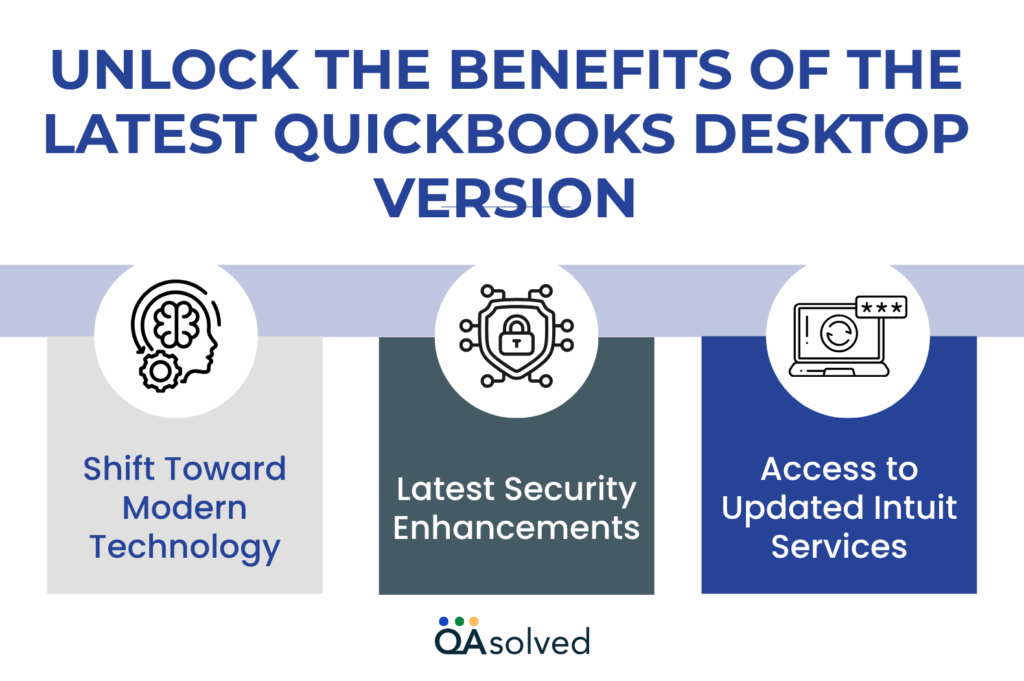
1. Shift Toward Modern Technology
Upgrading to the latest QuickBooks version allows your business to stay in sync with modern accounting practices and technology. Newer versions are built to integrate better with current systems, offer improved performance, and support advanced tools that simplify everyday tasks.
2. Latest Security Enhancements
With each new release, QuickBooks introduces enhanced security features to protect your financial data from evolving threats. By upgrading, you ensure your software receives critical security updates that help safeguard sensitive information and minimize the scope of vulnerabilities.
3. Access to Updated Intuit Services
Upgrading ensures uninterrupted access to essential Intuit services such as payroll, payments, and online banking. These services are regularly updated to improve functionality and reliability, and they are only supported on the latest versions.
Conclusion
As QuickBooks Desktop 2023 is reaching its end of life, it’s important for every user to understand what the QuickBooks Desktop 2023 ending means for their business. After May 31, 2026, key services such as payroll, credit card processing, online banking, and technical support will no longer be available. The good news is that you have multiple upgrade paths available. Whether you choose QuickBooks Online for flexibility, QuickBooks Desktop Plus 2024 for familiarity, or QuickBooks Enterprise 24.0 for advanced capabilities, transitioning to a supported solution ensures your business remains productive, secure, and future-ready.
Taking a proactive approach now will help you avoid last-minute disruptions and give you enough time to plan a seamless migration. The sooner you act, the easier it will be to adapt, optimize your workflows, and continue managing your finances with confidence beyond the QuickBooks Desktop 2023 discontinuation.
Frequently Asked Questions
QuickBooks Desktop 2023 will remain officially supported until May 31, 2026. After this date, users will no longer have access to essential services such as security updates, live technical assistance, payroll features, and online banking integrations. To ensure uninterrupted operations and continued access to these critical functionalities, it is strongly advised to plan an upgrade or transition to a newer version before the support period ends.
To move from QuickBooks Desktop 2023 to the 2024 version, start by creating a backup of your company file to prevent any data loss. Next, download the QuickBooks Desktop 2024 installation file from Intuit’s official website. Run the installer, enter your valid license and product details, and select the “Express” installation option to replace your existing 2023 version.
Once the installation is complete, open your company file in the new version. QuickBooks will prompt you to update the file to the latest format, simply confirm using your admin credentials to complete the upgrade process.
Yes, most modern versions of QuickBooks Desktop, including Pro Plus, Premier Plus, and Enterprise, operate on a yearly subscription model. This means you need to renew your subscription each year to continue using the software without limitations. If the subscription is not renewed, your access becomes restricted. You may lose the ability to create or edit transactions, use payroll services, and access live customer support.
Yes, QuickBooks Desktop can still be purchased, but there are some important limitations. As of September 30, 2024, Intuit has discontinued the sale of new subscriptions for Pro Plus, Premier Plus, and Mac Plus to new customers in the United States. However, QuickBooks Desktop Enterprise is still available for new purchases. Existing users of other Desktop versions can continue to renew their current subscriptions, ensuring ongoing access to the software and its services.
The right choice depends on your business needs and how you prefer to work. QuickBooks Online is often the better option for modern businesses that value flexibility, cloud access, and automation. It allows you to access your data from anywhere, collaborate easily with your team, and benefit from automatic updates.
On the other hand, QuickBooks Desktop is better suited for businesses that require advanced features such as complex inventory management, detailed reporting, and greater control over locally stored data. However, it typically involves higher annual costs and is seeing reduced long-term support compared to the online version.