

Sales tax continues to be one of the most significant and complex components of doing business in the United States. It is applied as a percentage of a product or service’s sale price and collected at the point of purchase, with businesses responsible for accurately calculating, collecting, reporting, and remitting the tax to the appropriate state and local authorities. While this process may sound straightforward, the reality in 2026 is far more complicated.
The U.S. sales tax system is highly fragmented. With 50 states imposing statewide sales tax, along with thousands of counties, cities, and special tax jurisdictions, rates can vary dramatically from one ZIP code to another. In fact, the compliance burden has never been heavier on eCommerce sellers, SaaS providers, retailers, wholesalers, and service-based businesses across regions.
On top of this, Inaccurate sales tax calculations can lead to under-collection, over-collection, audit risks, penalties, and damage to customer trust. For MSMEs and CPAs managing multiple clients, manually tracking rates and tax rules is not only time-consuming but also prone to costly human error.
This is why a reliable and automated sales tax calculator is no longer optional in 2026; it is a necessity. A sales tax calculator enables teams to apply the correct rate based on location, manage multi-state compliance, mitigate audit risks, and maintain accurate financial records. In this blog, we will break down why every U.S. business needs a robust sales tax calculator in 2026 and will also explain how sales tax rules differ across industries and states. Let’s dive in. So, let’s begin with it.
How to Calculate Sales Tax in the United States?
Calculating sales tax involves determining the appropriate rate and applying it to the taxable sale amount. Here’s a step-by-step guide:
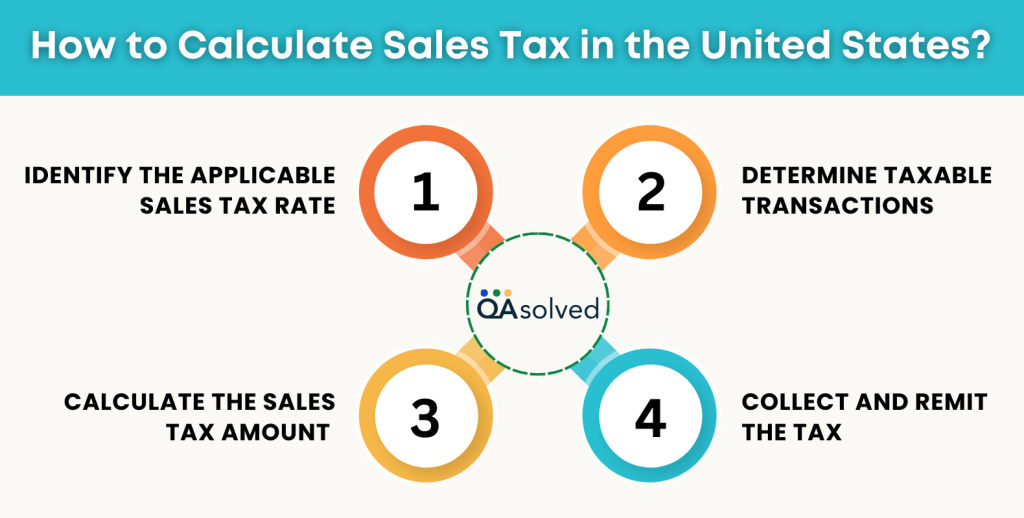
Step 1: Identify the Applicable Sales Tax Rate
Note: Sales tax rates in the U.S. vary by state and locality.
- Consult your State’s Tax Authority to determine the applicable tax rate.
- IRS Resources: While the IRS doesn’t set sales tax rates, it promotes usage of business sales tax calculator to help taxpayers estimate deductions.
Step 2: Determine Taxable Transactions
Note: Not all goods and services are subject to sales tax. Taxability can vary based on:
- Product Type: Necessity goods like groceries or medications may be subject to taxes in some states.
- Services: Services are taxable, while others are not, depending on state laws.
Step 3: Calculate the Sales Tax Amount
Here are the steps to calculate business sales tax:
- Determine the correct sales tax rate by researching each state and jurisdiction individually.
- Convert the sales tax rate to decimal format (dividing by 100).
- Multiply the price of the item by the sales tax rate in decimal format to calculate the sales tax.
- Add the sales tax to the price of the item to get the total transaction amount.
Here’s the formula to calculate business sales tax:
Total Sales Tax Rate = State Sales Tax Rate + Any Additional Local Sales Tax Rates
Where:
- Price of the Product or Service is the amount the customer is paying for the item or service before tax.
- Sales Tax Rate is the percentage rate of sales tax imposed by the state or local jurisdiction.
For example, a business located at 1234 Elm Street, San Francisco, California, would calculate the total sales tax rate as follows: - California State Sales Tax Rate: 7.25%
- San Francisco Local Sales Tax Rate: 1.5%
- Total Sales Tax Rate = 8.75%
If your business needs to charge sales tax and calculate it manually, use this formula:
- Sales Tax = Sales Price × Total Sales Tax Rate
This ensures your business applies the correct sales tax by factoring in both state and local tax rates.
Step 4: Collect and Remit the Tax
As a seller:
- Collection: Collect the calculated sales tax at the point of sale.
- Remittance: Regularly remit collected taxes to the appropriate state or local tax authority as per their specified schedule.
So, these are the steps to successfully calculate business sales tax. Though they seem quite easy, the actual hurdle comes when you get down to calculating it for multiple products and services. That is exactly when business sales tax calculator comes into the equation. In the past couple of decades, the demand for online business sales tax calculators has skyrocketed. Let’s talk about the best in the business.
Also Read: How to Set Up and Use Automated Sales Tax in QuickBooks Online?
Top 5 Sales Tax Calculators for Businesses and CPAs
Managing sales tax accurately is crucial for businesses to remain compliant and avoid penalties. Thankfully, there are several reliable tools available to streamline this process. Here are the top 5 sales tax calculators that can help businesses calculate and track their sales tax with ease:
1. QuickBooks Sales Tax Calculator
QuickBooks Online Sales Tax Calculator us an essential tool for businesses looking for an easy, accurate way to manage their sales tax obligations. It flawlessly integrates with QuickBooks accounting software, making it ideal for businesses already using the platform for bookkeeping and financial management.
Here’s why QuickBooks Business Sales Tax Calculator is Ideal:
- Automatic Rate Calculation: QuickBooks automatically determines the appropriate sales tax rate based on the customer’s location, including local, state, and national tax rates.
- Real-Time Updates: QuickBooks Sales Tax Calculator also ensures that tax rate is updated with the latest changes in tax laws and rates across various jurisdictions.
- Integrations: Intuit has been successful in creating an ecosystem where third-party applications easily integrate with its different QuickBooks products. On top of that, its own business sales tax calculator easily integrates with QuickBooks Online, eliminating the need for manual data entry and minimizing errors.
- Customizable Tax Settings: With QuickBooks Sales Tax Calculator, you can create different tax categories and adjust rates for specific products and services effortlessly.
- Tax Products: It also provides detailed sales tax reports that can be used for filing tax returns and audits.
All these things make QuickBooks Sales Tax Calculator one of the ideal solutions for MSMEs and even CPAs.
2. Avalara AvaTax
Avalara AvaTax is a comprehensive sales tax automation solution designed for businesses of all sizes. It handles complex tax calculations and integrates with numerous accounting, ERP, and e-commerce platforms. AvaTax ensures compliance with state and local tax laws, providing real-time tax calculation across multiple jurisdictions.
3. TaxJar Sales Tax Calculator
TaxJar is a cloud-based platform focused on automating sales tax calculations for e-commerce businesses. It offers real-time sales tax rate lookups and integrates with popular e-commerce platforms like Shopify and Amazon. TaxJar helps businesses stay compliant and make tax reporting effortless.
4. Taxify by Sovos
Taxify, now part of Sovos, is a sales tax automation solution that helps businesses calculate taxes based on location-specific rules. It’s ideal for businesses that operate across multiple states and countries. Taxify provides accurate sales tax rates and supports automated filing, helping businesses save time and reduce compliance risks.
5. Xero Sales Tax Calculator
Xero offers a simple sales tax calculator as part of its cloud-based accounting software. With automatic tax rate updates and integration with accounting records, it allows businesses to calculate and track sales tax efficiently. Xero’s user-friendly interface makes it a good choice for small businesses and startups.
So, these are five of the most popular and effective business sales tax calculators that can simplify the process of tracking and managing sales tax. With real-time updates and automatic tax rate adjustments, tools like QuickBooks can significantly reduce the burden of manual calculations. QB not only enhance business sales tax calculation but can also set up job costing in Online and Desktop versions.
Understanding the U.S. Sales Tax by Different Sectors
In 2026, calculating U.S. sales tax is no longer a one-size-fits-all process. Different industries are subject to varying tax treatments, exemptions, sourcing rules, and compliance requirements depending on the nature of the goods or services sold. Understanding how your industry is taxed is the first step toward maintaining compliance and protecting your business from regulatory risks. Let’s take a quick look!
1. Clothing Sales Tax in 2026
As of 2026, many U.S. states continue to treat clothing differently when it comes to sales tax. Some states impose full taxation; others provide partial exemptions based on price thresholds, and a few don’t tax clothing at all.
Partial Exemptions Based on Price Thresholds:
States like Massachusetts still provide a form of tax relief on clothing purchases by exempting part of the sales price:
- In Massachusetts, clothing and footwear items are generally exempt from sales tax up to a certain dollar threshold (currently $175 per individual item). Only the amount exceeding $175 is subject to the state’s sales tax.
- Items designed for specific uses, like athletic wear or protective clothing, may remain fully taxable even if they meet the exemption threshold.
This exemption approach hasn’t changed in 2026, according to the latest state guidance and tax expenditure budgets, meaning businesses must still calculate tax only on the portion above the set threshold for such states.
2. Sales Tax on Automotive (Cars) in 2026
When it comes to calculating sales tax on automobiles in the United States, things can get surprisingly complex. Unlike many everyday retail products, car sales are often subject to special tax structures that vary by state, vehicle value, and even how the vehicle will be used.
In 2026, the Connecticut automotive sales tax is generally 6.35% for most vehicle purchases. However, a higher luxury tax rate of 7.75% applies to motor vehicles with a sales price exceeding $50,000.
Understanding these distinctions is critical for dealerships, resellers, and even individual buyers. Here is how automotive sales tax typically differs:
A. Taxable at Different Rates Based on Price Points
Some states apply tiered tax rates depending on the vehicle’s selling price. This means a lower rate may apply to vehicles below a certain threshold, while a higher rate applies once that price is exceeded.
B. Taxable Based on Use or Purpose
Not all vehicles are taxed the same way. In some states, vehicles may qualify for partial or full exemptions depending on their use. For instance, certain farm vehicles, ambulances, driver training vehicles, or vehicles received as bona fide gifts may be exempt from sales tax in a few states. The eligibility criteria, however, must be carefully reviewed to avoid compliance issues.
C. Local Sales Tax Considerations
In states such as Washington, local jurisdictions can impose additional sales tax on top of the state rate. This means the total tax on a vehicle purchase may vary depending on the city or county where the transaction takes place. In contrast, states like Connecticut do not levy additional local sales tax on vehicle sales, making the calculation relatively more straightforward.
Because automotive sales tax rules differ not only by state but also by price and usage classification, businesses involved in vehicle sales must ensure accurate calculations. Which means the need for a sales tax calculator is nowhere close to fading from the market.
3. Electronics
It comes as no surprise that the sale of electronics and hardware products is taxed differently across the United States. What may seem like a simple purchase, such as buying a laptop, server, or networking equipment, can carry very different tax implications depending on the state and even the local jurisdiction where the transaction takes place.
A. Sales Tax Varies Across States
Just like most tangible goods, electronics like computers, tablets, and hardware accessories are generally subject to state and local sales tax at the point of sale.
Note: The exact combined rate depends on the state’s base tax and any local add-ons by cities, counties, or districts. Each jurisdiction sets its own rules, so electronics taxes can differ significantly from one location to another.
B. Tax-Exempt Electronics Based on Use
As of 2026, New York’s Tax Law continues to provide a specific exemption for certain computer system hardware when it is used directly and predominantly in qualifying business activities. This is codified under New York Tax Law § 1115(a)(35), which remains in effect and outlines the conditions of the exemption.
In short, computer hardware can be purchased without paying New York state and local sales tax if:
- It is used directly and predominantly (more than 50% of the time)
- For developing software for sale, or
- For designing and building websites for clients
This means if a business primarily uses computers, servers, or related equipment to create software products or provide web development services, the purchase may qualify for exemption.
C. Sales Tax Holidays & Other State Options
Some states offer temporary tax holidays where electronics under certain price thresholds can be purchased without sales tax for a limited time (e.g., during back-to-school events). These exemptions vary by state and year and usually apply only to consumer purchases rather than business purchases.
4. Real Estate Sales Tax in 2026
In 2026, taxation tied to U.S. real estate transactions remains a mix of federal capital gains tax, possible state taxes, and other tax planning provisions rather than a straightforward “sales tax” as you’d see on consumer goods. Here’s the updated and authentic breakdown based on current tax law and the major changes that take effect in 2026:
- Long-term capital gains (for properties held more than one year) are taxed at 0%, 15%, or 20%, depending on your taxable income level. These rate brackets are adjusted for inflation in 2026.
- Short-term gains (property held for one year or less) are taxed as ordinary income tax rates, which can be higher.
- In addition to the federal rate, many states also tax capital gains as ordinary income at the state level when you sell property. (State rules vary by state.)
In A Nutshell
Sales tax compliance in the United States is no longer a simple percentage added at checkout. In 2026, businesses must navigate varying state and local tax rates, industry-specific exemptions, economic nexus rules, and constantly evolving regulations. Whether you operate in retail, automotive, electronics, clothing, SaaS, or real estate, the way sales tax applies to your transactions can differ significantly based on location, product type, and usage.
As we have seen, even seemingly straightforward categories such as clothing or electronics can carry price thresholds, use-based exemptions, or local tax additions. Automotive sales may involve tiered rates or special classifications, while real estate transactions are influenced by capital gains rules and state-level considerations. For MSMEs and CPAs managing multi-state operations, manually tracking these variables increases the risk of errors, penalties, and audit exposure.
This is exactly why a reliable sales tax calculator has become essential in 2026.
Frequently Asked Questions
Business sales tax is important because it ensures compliance with state and local tax laws, helping businesses avoid fines, penalties, and legal issues. Accurately collecting and remitting sales tax builds customer trust and credibility, showing that your business operates with integrity.
QuickBooks Sales Tax Calculator is one of the most famous and widely used tools. Its robust features make it an ideal solution for businesses of all sizes and verticals.
Yes, quite easily! QuickBooks Payroll software offers automated features that calculate federal, state, and local payroll taxes for each pay period, using current tax rates and employee details. Key benefits include automatic updates to federal and state tax rates every year.
In 2026, some of the best free business sales tax calculators include tools from Avalara, TaxJar, Vertex Inc., and Stripe. These platforms offer free online sales tax rate lookup calculators that provide accurate state, county, city, and special district tax rates based on ZIP code. While they are reliable for quick estimates and spot-checking rates, they generally do not include full automation features such as economic nexus tracking, multi-state registration, or return filing unless you upgrade to a paid plan.
Yes, most reputable online sales tax calculators provide accurate rate lookups. However, free tools typically offer rate estimation only and may not include automation features like nexus tracking, exemption handling, or return filing.
Yes. Ecommerce sellers shipping products across state lines must apply destination-based sales tax rates, which vary not only by state but also by county, city, and special tax districts. Since tax rates can change frequently and differ from one ZIP code to another, manually calculating sales tax can quickly become complex and error-prone.